How to Deposit to Polymarket in 2026: Supported Tokens, Networks and Step-by-Step Guide
Introduction
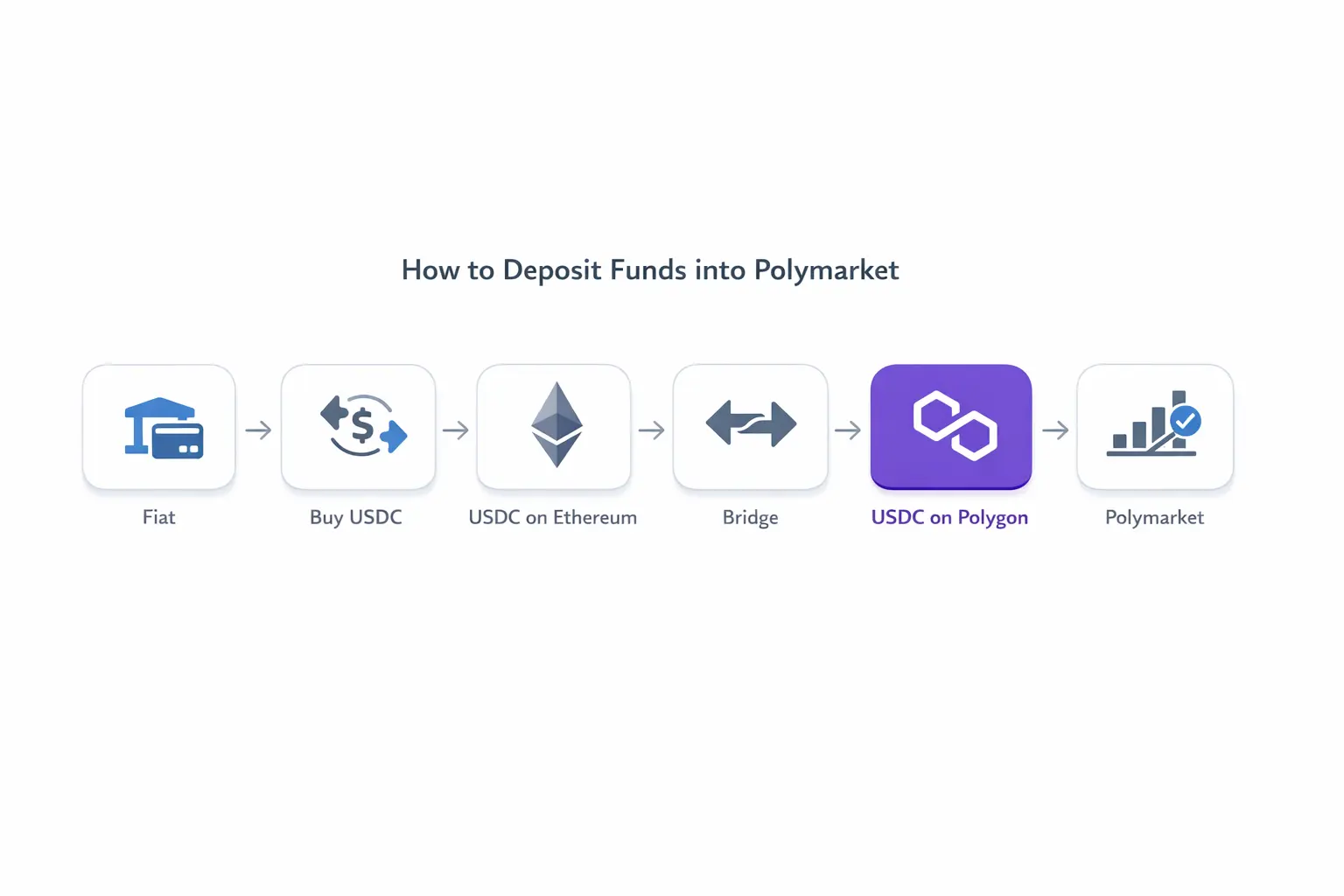
The process for funding Polymarket has changed. The standard route is no longer to buy USDC, bridge it manually to Polygon, keep MATIC for gas, and connect MetaMask. Polymarket now gives each account dedicated deposit addresses and accepts supported assets from multiple networks.
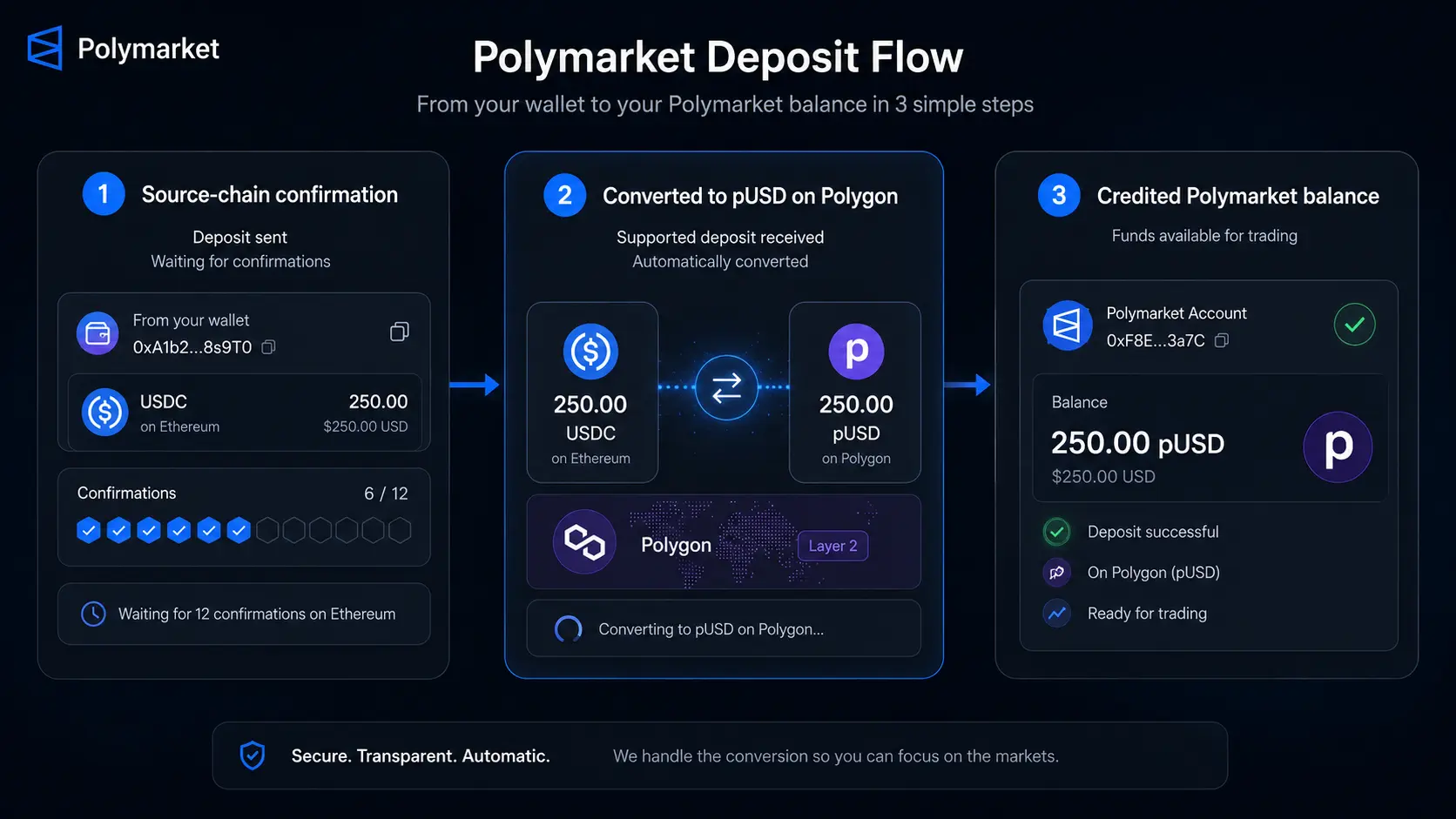
When you use Deposit → Transfer Crypto, Polymarket shows the address for the selected network. After you send a supported asset, Polymarket’s bridge converts it automatically into pUSD on Polygon and credits the balance to your account. For most deposits, this means manual bridging to Polygon is no longer required.
The asset, network, address, and minimum still have to match. This guide explains the current flow and the extra self-custody-wallet step required when you start with fiat through J2TX.
What You Need Before Depositing
Before sending funds, make sure you have:
- A Polymarket account. You can sign up with email, Google, or a supported crypto wallet. Use the same login method whenever you verify an address or investigate a missing deposit.
- A supported asset on a supported network. Support is based on the token-and-network combination, not the token symbol alone.
- The deposit address displayed inside Polymarket. Copy it from Deposit → Transfer Crypto after choosing the asset and network. Do not substitute your public Polymarket profile wallet address.
- Enough funds to meet the live minimum. Check the amount shown in the deposit interface immediately before sending.
- Enough balance to pay the sending fee. A self-custody wallet normally needs the source network’s native gas token. An exchange or on-ramp may charge a withdrawal fee instead.
How to Deposit Crypto to Polymarket
Step 1 — Create or sign in to your Polymarket account
Open Polymarket and create an account, or sign in with the same email, Google account, or crypto wallet you normally use. Deposit addresses are tied to a specific Polymarket profile, so changing login methods can lead you to a different account.
Step 2 — Click Deposit
Open the Deposit menu from your account. Unlike the former wallet-only flow, Polymarket now has a dedicated deposit action.
Step 3 — Select Transfer Crypto
Choose Transfer Crypto as the deposit method. This opens the supported token and network options available for crypto transfers.
Step 4 — Choose the asset and network
Select the exact asset you plan to send, then select its current network. For example, USDC on Ethereum and USDC on Base are different transfer routes even though both use the USDC symbol.
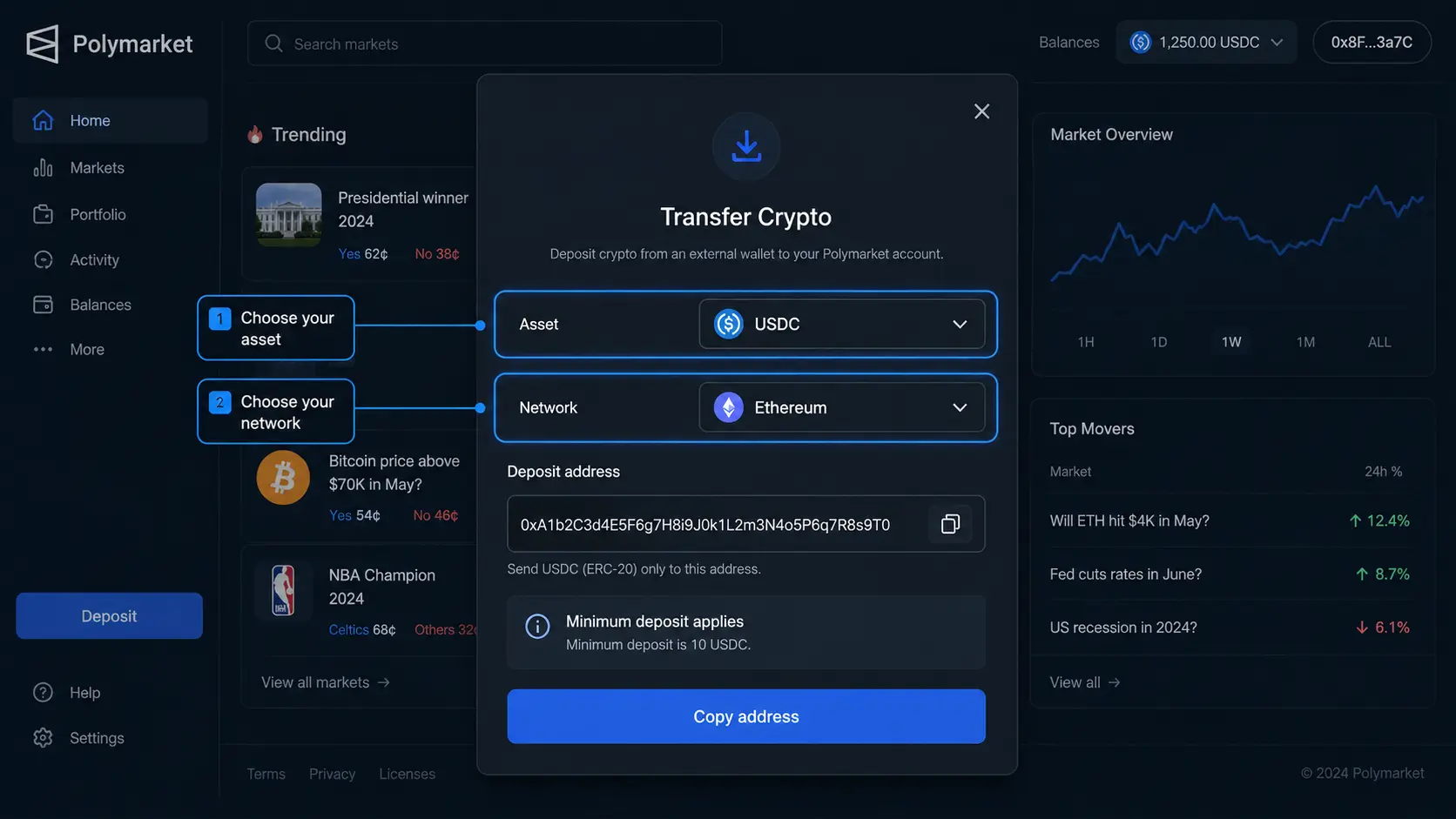
Step 5 — Copy the displayed deposit address
Copy the address Polymarket displays for the selected route. Polymarket assigns fixed deposit addresses to your profile, with different address types for EVM networks, Solana, Bitcoin, and Tron. Always use the address currently shown in your account and verify its first and last characters before sending.
Step 6 — Check the live minimum
Read the minimum shown for that asset and network. Do not rely on an amount from an older guide or screenshot: minimums can change and are not the same across all networks.
Step 7 — Send a small test transaction
If the live minimum and network fees make it practical, first send a small amount that is at or above the displayed minimum. Confirm that it reaches the correct Polymarket account before transferring a larger balance. A transfer below the minimum is not a valid test and may remain pending or fail to process.
Step 8 — Wait for conversion and crediting
After the source transaction confirms, Polymarket routes the deposit, converts it into pUSD on Polygon, and credits your balance. Refresh the page after confirmation. Processing often takes a few minutes, but network conditions and compliance checks can make it take longer.
How Polymarket Deposits Work
Polymarket uses pUSD, or Polymarket USD, as the collateral token for trading. It is an ERC-20 token on Polygon backed by USDC. You do not normally need to obtain pUSD yourself.
The deposit flow works like this:
- Polymarket provides a deposit address associated with your account.
- You send a supported token from the matching source network.
- The bridge routes and swaps the deposit automatically.
- pUSD is credited to your Polymarket balance for trading.
EVM networks such as Ethereum, Polygon, Arbitrum, Base, Optimism, and BNB Chain use the EVM address type. Solana, Bitcoin, and Tron use their own address types. The official deposit documentation explains these address families and the automatic conversion process.
Your deposit address is not the same thing as your Polymarket profile wallet address. The deposit address appears under Deposit → Transfer Crypto and routes supported deposits through Polymarket’s bridge. The profile address is the Polygon wallet associated with your account. Copying the profile address instead is a common cause of missing deposits.
How to Fund Polymarket Starting With Fiat
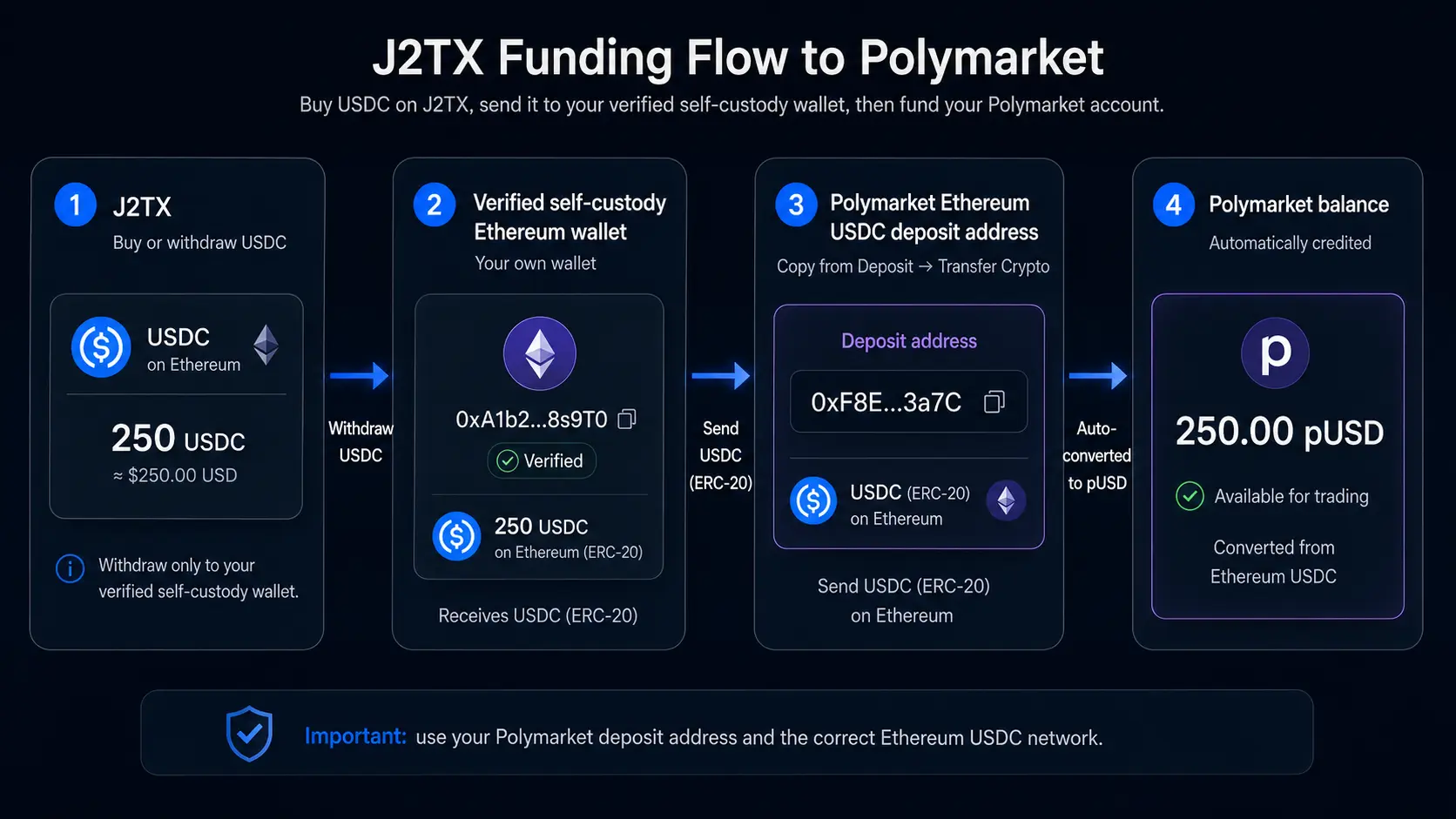
If you start with fiat, you can buy a supported asset through an exchange or on-ramp, withdraw it to a self-custody wallet, and then send it to the matching address displayed by Polymarket.
For J2TX, use this route:
J2TX → verified self-custody Ethereum wallet → Polymarket Ethereum USDC deposit address
- Buy USDC through J2TX.
- Add and verify your own self-custody Ethereum wallet in your J2TX account.
- Withdraw USDC on Ethereum from J2TX to that verified wallet.
- In Polymarket, choose Deposit → Transfer Crypto → USDC → Ethereum and copy the displayed deposit address.
- From your self-custody wallet, send a test amount at or above Polymarket’s live minimum.
- After it is credited, send the remaining amount if needed.
Do not enter the Polymarket deposit address as the withdrawal destination in J2TX. J2TX currently supports crypto transfers only to and from the customer’s verified self-hosted wallets, as described in the J2TX Exchange Terms & Procedure. The intermediate wallet is therefore required for this route.
Supported Networks and Assets
Polymarket supports many token-and-network combinations. Common examples currently include:
- Ethereum: ETH, USDC, USDT, WBTC, DAI, and other supported ERC-20 tokens.
- Polygon: POL, USDC, USDT, DAI, and WETH.
- Arbitrum, Base, and Optimism: ETH, USDC, USDT, DAI, and selected network-specific assets.
- BNB Smart Chain: BNB, USDC, USDT, DAI, ETH, and BTCB.
- Solana: SOL, USDC, USDT, and selected SPL tokens.
- Bitcoin: BTC on the Bitcoin network.
- Tron: supported TRC-20 assets such as USDT.
The official list also includes newer networks such as HyperEVM, Abstract, Monad, Ethereal, Katana, and Lighter. This is not a permanent or exhaustive list. Supported tokens and minimums change, so check the choices inside Polymarket and the current supported-assets documentation before every deposit.
Seeing a token symbol on the list does not mean every version of that token is supported. Match the network and, where relevant, the token contract selected in the deposit interface.
Minimum Deposits and Fees
Each supported token-and-network pair has its own minimum. Follow the minimum shown in Polymarket’s deposit interface at the time of your transfer. Official help and technical pages can display different examples, and an older screenshot may already be out of date.
A deposit below the applicable minimum may remain pending or fail to process. Do not send another arbitrary amount without first checking the current threshold; follow the instructions shown in your account.
The total cost may include:
- a network gas fee when sending from a self-custody wallet;
- an exchange or on-ramp purchase and withdrawal fee;
- bridge, routing, or conversion costs;
- swap impact or slippage when the source asset has to be converted.
Polymarket’s bridge quote can include estimated output and a fee breakdown, but estimates can change with market and network conditions. Compare the amount sent with the amount expected to be credited before approving a large transfer.
You do not need to keep MATIC or POL merely to fund Polymarket from another supported chain. You need the native gas asset of the source network when your own wallet is sending the transaction.
Common Deposit Mistakes
- Choosing the wrong network. The destination address alone is not enough; the route must support the network you send from.
- Choosing or sending the wrong asset. Match the token and network shown in Polymarket, including the correct token contract where applicable.
- Sending below the live minimum. A tiny transfer below the threshold may not be processed.
- Copying the profile wallet instead of the deposit address. Use the address under Deposit → Transfer Crypto, not an address copied from your public profile.
- Using an address associated with another login method. Sign in to the intended profile before copying the address, especially if you have used email, Google, and wallet logins.
- Skipping the test transaction. A qualifying test transfer can expose an address or network mistake before a larger balance is at risk.
- Using an old saved address without checking. Polymarket describes deposit addresses as fixed, but you should still verify the address displayed in your profile before each transfer.
Blockchain transfers cannot simply be reversed. Checking the asset, network, address, and live minimum before you approve the transaction is more reliable than trying to recover it afterward.
Recovering a Missing Deposit
If a deposit has not appeared:
- Save the transaction hash or transaction ID.
- Check the source transaction in the appropriate block explorer and confirm it succeeded.
- Verify the token, source network, destination address, and live minimum.
- Refresh Polymarket or sign out and back in with the same login method used for the intended profile.
- If a transfer made through Deposit → Transfer Crypto is confirmed on-chain but still missing after the normal processing window, contact Polymarket Support and provide the transaction hash, token, amount, and network.
Polymarket also provides a wallet recovery portal for certain transfers, including some assets sent to a profile wallet instead of the correct deposit address. Recovery is not guaranteed. Unsupported networks, unrelated addresses, and some contract transfers may be unrecoverable, and a recovery can require an additional gas payment.
Read Polymarket’s missing-deposit guidance before using the portal. Never send a recovery payment to an address supplied in an unsolicited message.
FAQ
Can I deposit USDT, ETH, or BTC?
Yes, when the specific token-and-network combination appears in Polymarket’s deposit interface. USDT and ETH are supported on selected networks, and BTC can be deposited through the Bitcoin route. Never assume support from the symbol alone; verify the live selection and minimum before sending.
Do I need to bridge to Polygon?
Usually not. Polymarket’s deposit system accepts supported assets from multiple networks and converts them into pUSD on Polygon automatically. Manual bridging may still be useful in a specialized case, but it is no longer the standard deposit flow.
Why is my deposit pending?
The source transaction may still be confirming, the bridge may still be routing and converting it, or the deposit may be undergoing a compliance check. A transfer below the current minimum, or one made with the wrong asset or network, may also fail to process. Check the transaction on a block explorer, confirm the deposit details, refresh Polymarket, and contact support with the transaction hash if a confirmed transfer remains missing.
Do I need a self-custody wallet?
Not to create a Polymarket account: Polymarket also supports email and Google signup. To make a crypto deposit, you need a wallet or withdrawal service that can send the exact supported asset on the selected network. A self-custody wallet is required for the J2TX route because J2TX withdrawals must first go to your own verified wallet.
Can I deposit directly from J2TX?
No, not under J2TX’s current wallet-verification rules. Withdraw from J2TX to your verified self-custody Ethereum wallet first. Then send USDC from that wallet to the Ethereum USDC deposit address displayed inside Polymarket.
Is Polymarket available in my country?
Polymarket restricts trading in certain countries and regions, and the list can change. Check Polymarket’s current geographic restrictions and terms before creating an account or sending funds. Do not fund an account if trading is unavailable in your location, and do not attempt to bypass geographic restrictions.